For creating a laser show combined with video, which version of Pangolin Beyond should I choose?

hrimfaxi09

New Member
Hello, I would like to purchase Pangolin Beyond, but I’m feeling quite confused about the differences between the three versions of Beyond. I’ve been using the demo version for testing, but many of the functions in the demo are locked, which makes it difficult for me to fully evaluate it.


I would really appreciate advice on which version of Pangolin Beyond would be most suitable for my use case.


I’m planning to use Beyond to create a laser show combined with LED screen visuals. The laser beams will follow the music and shoot toward a large LED screen, while the LED screen plays pre-produced videos.


The show will include effects such as:


  • Using lasers to “engrave” the client’s company logo onto the LED screen
  • Various laser cutting effects synchronized with the music
  • LED screen videos that simulate laser cutting effects

My setup will be:


  • Avolites Quartz sending Art-Net to a PC
  • The PC will run Resolume Arena (for video playback) and Pangolin Beyond at the same time
  • The laser machines will use network-enabled Pangolin FB4

I’ve read some cases on the Pangolin forum. If I understand correctly, it seems that I may need the Universe Editing feature in the Advanced version in order to overlay video onto a universe window, and then create the laser programming based on that universe window.


However, since many functions in the demo version are locked, I’m not completely sure which version of Beyond I actually need.


I would really appreciate the recommendation.
Thank you.
 
Last edited:
I have participated in nearly a hundred performance evenings of the type you mentioned. You only need to purchase the entry-level version to meet your needs, but I still recommend you choose the flagship version. This is because the cooler feeling in this type of performance comes more from video production. After all, the flagship version has more features and can produce cooler effects.
 
I own advanced as a freelancer and have only needed to use ultimate if I have a show with more than 24 lasers (in that situation, the company that hired me provides a license). Here is a comparison of quickshow and each beyond level: Linky . You can choose what level of Beyond to test when you start the demo up, but unless you know what you're looking for it might be tough to tell the differences. Ultimate has a video tracing feature that might look attractive but it rarely gives good results.

One thing that comes to mind is wether both Resolume and Beyond on the same pc is going to cause issues. For sure you'll need two network adapters, I use the PC's built in one for the laser network and a usb one for artnet (are you planning to send artnet time code or just a channel at a value to start both?). I don't know if both softwares will have issues with sharing the one network though.

I know one guy who uses the universe to with the video and laser preview overlayed as you mentioned for programming and he gets reasonable results. I prefer to use a video projector and a laser so I can really see what is happening with the laser. Just put a lower resolution (constant bit rate) version of the video on the timeline and it's easy to step through for programming.
 
Thank you for your suggestions. I tested running Resolume Arena and Pangolin Beyond on the same computer, and then used Avolites Quartz to trigger both the Resolume Arena video and the Beyond cues via Art-Net.


I used the method “just a channel at a value to start both”, and after testing it several times everything worked normally, so I believe it should be fine.

Screenshot 2026-03-21 180434.png

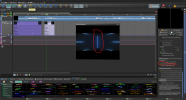
After trying the demo version, I found a method that works very well for me to draw the laser show paths based on a continuously moving video. In the Timeline > selech cue > Event, there is a Video Masking option where I can select “Create a ‘Blanked Inside’ mask.”


When I enable this, my laser graphics overlay a black area on top of the video preview. I can use this black area as a reference to determine the position of my laser graphics and continuously adjust the position according to the movement of the video.


However, since the overlay area is black, I need to invert my laser video to a white background so that I can clearly see the black overlay area. Of course, after completing the timeline show, I will still need to do final adjustments based on the distance and angle of the LED screen at the actual venue.


I believe I should purchase one Pangolin Beyond Advanced license for myself to design the laser shows, and another Pangolin Beyond Essentials license for my client.
This is because my client will not need to do any laser show editing. Most of the time, they will simply play the laser video timeline that I created.

I will export the timeline I designed in Beyond Advanced as a file and then load it into the client’s Essentials version. After that, I export the timeline as a Cue and place it on a page in a workspace, so that Avolites Quartz can trigger this cue via Art-Net.
I was not able to find a way to trigger timeline playback directly using Art-Net.
 
Last edited:
2.png

I chose BEYOND Advanced because I really need the Advanced Frame Editor feature. I will convert the laser video into image files, and then open these images as the background to draw the frames.


Unfortunately, Beyond Essentials does not have the function to open a background image in the Frame Editor.
 
Back
Top