
You are using an out of date browser. It may not display this or other websites correctly.
You should upgrade or use an alternative browser.
You should upgrade or use an alternative browser.
Synthesized image
- Thread starter phmn36741
- Start date


Hello,masterpj
There is the following type in the kind of CUE.
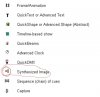
Frame,QuickText,QuickShape,Timeline show,QuickBeams,Advanced Clock,
QuickDMX, Synthesized Image, Sequence of cues, Capture.
I can play cue Synthesized Image and Sequence of cues by using the pre-set.
But,I don't know how to make new it from the beginning.
There is the following type in the kind of CUE.
Frame,QuickText,QuickShape,Timeline show,QuickBeams,Advanced Clock,
QuickDMX, Synthesized Image, Sequence of cues, Capture.
I can play cue Synthesized Image and Sequence of cues by using the pre-set.
But,I don't know how to make new it from the beginning.
smokeAndMirrors
Well-Known Member
A glaring omission is the ability to create a synth image from scratch. However, you can get the same result by copying an existing synth image, clearing it out and then adding your desired components.
William, Alexey - any chance of getting a "Create new synth image" menu item?
William, Alexey - any chance of getting a "Create new synth image" menu item?

whiteg
Well-Known Member
The Synthesized image is Cue type.
Each cue can contain a Frame (or animation), Text, Shape (abstract), Timeline-based show, Beam
sequence, Clock, DMX sequence, Synthesized image, a Sequence of other cues, or a Capture (many
other cues triggered simultaneously). In the lower left corner of each cue, you will see an icon. The icon
indicates what the cue contains. Below you will see a list of icons and the corresponding type of image.
Each cue can contain a Frame (or animation), Text, Shape (abstract), Timeline-based show, Beam
sequence, Clock, DMX sequence, Synthesized image, a Sequence of other cues, or a Capture (many
other cues triggered simultaneously). In the lower left corner of each cue, you will see an icon. The icon
indicates what the cue contains. Below you will see a list of icons and the corresponding type of image.
Hello
did u find how to make synthesized image from beginning?
Attachments
Agreed. I have never seen how to create a synthesized image from scratch, and it appears to be an oversight.
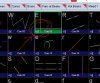
To create them I simply copy an existing cue that contains a synthesized image, then edit it. When you're on the editing screen you can then create new synthesized images from scratch.
To create them I simply copy an existing cue that contains a synthesized image, then edit it. When you're on the editing screen you can then create new synthesized images from scratch.

Aaron@Pangolin
Staff member
The ability to create this type of image has been removed; you can edit an existing synth image but you can no longer create one from scratch.